
How to fill out a VFR navigation log, column by column
Most students are handed a navlog with fifteen columns and no explanation of the order to fill them in. The order matters, because almost every column depends on the one before it. Here is the sequence, what each number means, and where it comes from.
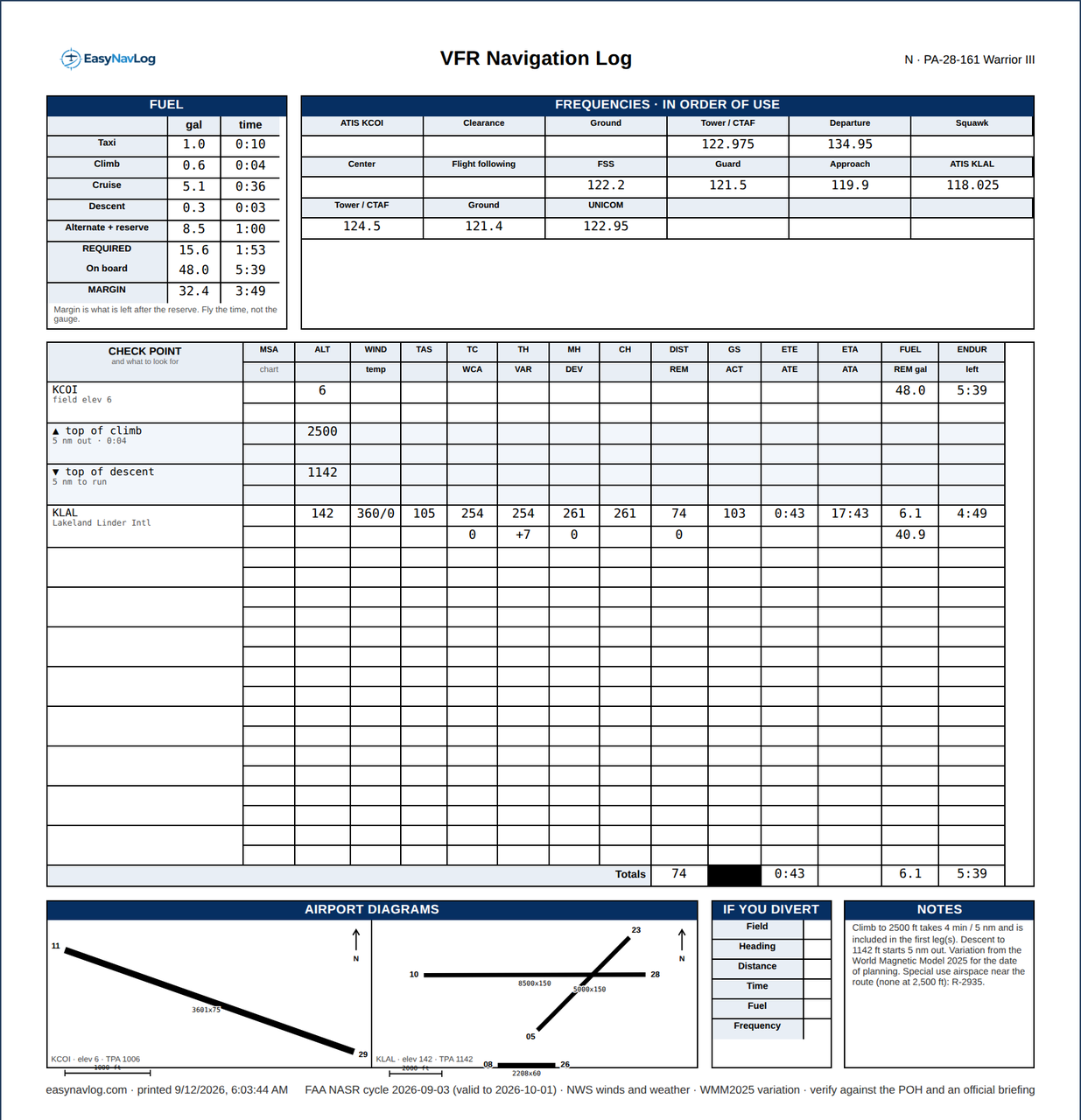
Fill it in this order
Work down the page one checkpoint at a time, and across the page in this sequence: course first, then wind, then heading, then time, then fuel. Every column to the right depends on something to its left, so jumping around is how errors creep in.
1. Checkpoints
Pick features you can actually identify from the air at your altitude: a town with a distinctive shape, a lake, an airport, a highway junction, a VOR. Space them ten to twenty nautical miles apart on a first cross-country, closer in unfamiliar terrain. Your departure and destination are the first and last rows.
2. True course
Measure the course between each pair of checkpoints against a line of longitude on the sectional, or read it off a plotter. This is a true course because sectional meridians point at true north, not magnetic north.
3. Wind correction angle
From the winds aloft forecast at your cruising altitude, solve the wind triangle for the angle you have to turn into the wind to track the course. On an E6B you set wind direction and speed, true airspeed and true course, and read the correction angle and ground speed. Turn right into a wind from the right, so a wind from the right gives a positive correction.
4. True heading
True course plus or minus the wind correction angle. This is the heading that would fly the course if your compass pointed at true north.
5. Variation
The angle between true north and magnetic north where you are, printed on the sectional as an isogonic line. Add westerly variation and subtract easterly variation. The mnemonic is east is least, west is best: east subtracts, west adds.
6. Magnetic heading
True heading corrected for variation. This is what you would fly if your compass were perfect.
7. Deviation
Your compass is not perfect. Metal and electrics in the airframe pull it a degree or two either way, and the correction card on the instrument panel tells you how much at each heading. Apply it to get compass heading, which is the number you actually fly.
8. Distance
Leg distance between checkpoints, plus a running total remaining. Measure along the course line, not point to point on a curved route.
9. Ground speed
Falls out of the same wind triangle as the correction angle. It is what actually determines your times, and it is why a headwind leg and a tailwind leg on the same flight look nothing alike.
10. Estimated time enroute
Leg distance divided by ground speed, in minutes. Add each leg to a running total so you have a cumulative time as well as a leg time.
11. Estimated time of arrival
Time off plus cumulative time enroute. Keep it in one time reference for the whole sheet, and if you are filing, use Zulu.
12. Fuel
Leg time multiplied by fuel burn, plus a running total of fuel remaining. Do not forget taxi and runup fuel at the start, or the climb, which burns at a higher rate than cruise. Then check what is left against your reserve: 30 minutes day VFR, 45 minutes night VFR, and 45 minutes plus the alternate for IFR.
The two columns people skip
The actual time and actual fuel columns are not decoration. Filling them in as you fly is how you find out that your ground speed assumption was wrong an hour before it becomes a fuel problem, and it is what turns a navlog from homework into a tool.
Why the order matters
Change the altitude and the winds change, which changes the correction angle, the heading, the ground speed, every time, and every fuel figure. That cascade is exactly why redoing a navlog by hand after a forecast update is so tedious, and why doing it once by hand teaches you something the second time does not. If you want a blank sheet to work through, there is a printable VFR navigation log here, free and with no account.
Doing it faster once you understand it
EasyNavLog fills in every one of these columns from the route and your aircraft numbers, using current FAA data for the airports, fixes and variation, and the NWS winds aloft forecast interpolated to your altitude. It also shows the arithmetic for a leg of your own flight on the How it works page, so you can check it against your own E6B work rather than taking it on faith.
Build one and check the math
Type a route, pick your airplane, and see every column filled in with the working shown.
Open EasyNavLogEasyNavLog is a planning and training aid, not a substitute for an official briefing. Verify every number against your POH or AFM, current charts and an approved weather source.